
How to Make a Product Demo Video in 2026: Brief, Script, Length & AI
 Xavier · Director of Operations16 min read
A good product demo video shows one person solving one problem inside your real product, in about a minute, with a clear next step at the end. To make one, write a one-page brief, script around 150 words per minute of video, capture the real interface, cut every second of waiting, add captions, and publish versions sized for each channel. This guide walks through each step with templates and benchmarks, compares four ways to produce a product demo video in 2026, and shows how an AI product demo video maker like Demoly can turn a product URL into a finished, narrated video in minutes.
What Is a Product Demo Video (and What It Isn't)?
A product demo video is a short recording of your actual product in use, narrated so a viewer understands what the product does and why it matters to them. The key word is actual: viewers watch the real interface, real clicks and real results, not an illustration of an idea.
That separates a product demo video from formats it often gets confused with:
| Format | What the viewer sees | Typical length | Funnel stage | Best for |
|---|---|---|---|---|
| Product demo video | The real product, used to complete a task | 45 s – 3 min | Consideration, decision | Landing pages, sales follow-up, trials |
| Explainer video | Animation or metaphor explaining the problem and idea | 60 – 90 s | Awareness | Homepage hero, new categories |
| Tutorial / how-to | Step-by-step instructions for a single task | 1 – 10 min | Onboarding, support | Help centers, in-app guidance |
| Interactive demo | A clickable replica the viewer drives themselves | Self-paced | Consideration | Self-serve evaluation |
| Launch video | A promo built around what is new | 30 – 90 s | Awareness, launch day | Product Hunt, social, announcements |
If your viewer already knows the problem and wants to know whether your product solves it, you need a product demo video. If they don't know the problem yet, start with an explainer or a launch video and link to the demo from there.
Why Product Demo Videos Matter in 2026
Buyers increasingly want to see the product before they talk to anyone. The data points below come from the original reports, with sample sizes noted so you can judge how much weight each one deserves.
| Finding | Source |
|---|---|
| 96% of people have watched an explainer video to learn about a product or service | Wyzowl, State of Video Marketing 2026 (survey of 266 marketers and consumers) |
| 80% of people say they bought or downloaded an app after watching a demo video | Wyzowl 2026 |
| 71% of video marketers say videos between 30 seconds and 2 minutes perform best | Wyzowl 2026 |
| Videos under one minute average a 52% engagement rate | Wistia, optimal video length analysis |
| 65% of viewers watch videos under one minute to the end; only 20% finish videos over 20 minutes | Vidyard, Video in Business Benchmark Report |
| "Their demo blew us away" as the deciding factor in a software purchase rose from 13% to 18% year over year | TrustRadius 2026 B2B Buying Disconnect |
| 61% of B2B buyers prefer a rep-free buying experience | Gartner, June 2025 (survey of 632 B2B buyers, Aug–Sep 2024) |
Two patterns stand out. First, shorter wins: every dataset above rewards videos that get to the point inside a minute or two. Second, the demo itself has become a decision driver, not a nice-to-have. When most buyers would rather not book a call, a product demo video is often the only salesperson they meet.
4 Ways to Make a Product Demo Video in 2026
There are four realistic routes. They differ less in final quality than in how much of your time they take, and in what happens the next time your interface changes.
| Method | Typical tools | Your time per video | Skills needed | When the UI changes | Best for |
|---|---|---|---|---|---|
| DIY screen recording | Camtasia, Loom, OBS, Descript | Hours to days | Scripting, recording, editing | Re-record and re-edit by hand | Teams with an in-house editor |
| Video production agency | Specialist demo studios, freelancers | Weeks, with review rounds | Briefing and feedback only | New brief, new quote, new wait | High-budget brand launches |
| Interactive demo platform | Arcade, Supademo, Storylane, Navattic | Hours to capture and annotate | Product knowledge | Recapture the affected steps | Self-serve, click-through tours |
| AI video tools | Avatar tools (Synthesia, HeyGen), prompt-to-video tools, URL-to-video agents (Demoly) | Minutes to an hour | Clear brief | Depends on type; URL-based tools re-run from the live product | Fast, repeatable product demo video production |
A few notes on the trade-offs:
- Agencies produce polished work and handle storytelling for you, but every change is a new round of briefing, quoting and review. Product demo video production through an agency makes sense for a flagship launch, less so for a feature that ships next sprint.
- Interactive demos are excellent when buyers want to click around, but they are a different asset: they don't play on a feed, in an email thumbnail or on a TV at a trade show booth.
- AI tools are not one category. Avatar tools put a presenter on screen but don't operate your product. Prompt-to-video tools generate footage from text, which suits physical products more than software. URL-to-video agents open your real product in a browser, explore it, and record what they do, which is the closest AI equivalent to a human-made software demo video.
How to Make a Product Demo Video: 7 Steps
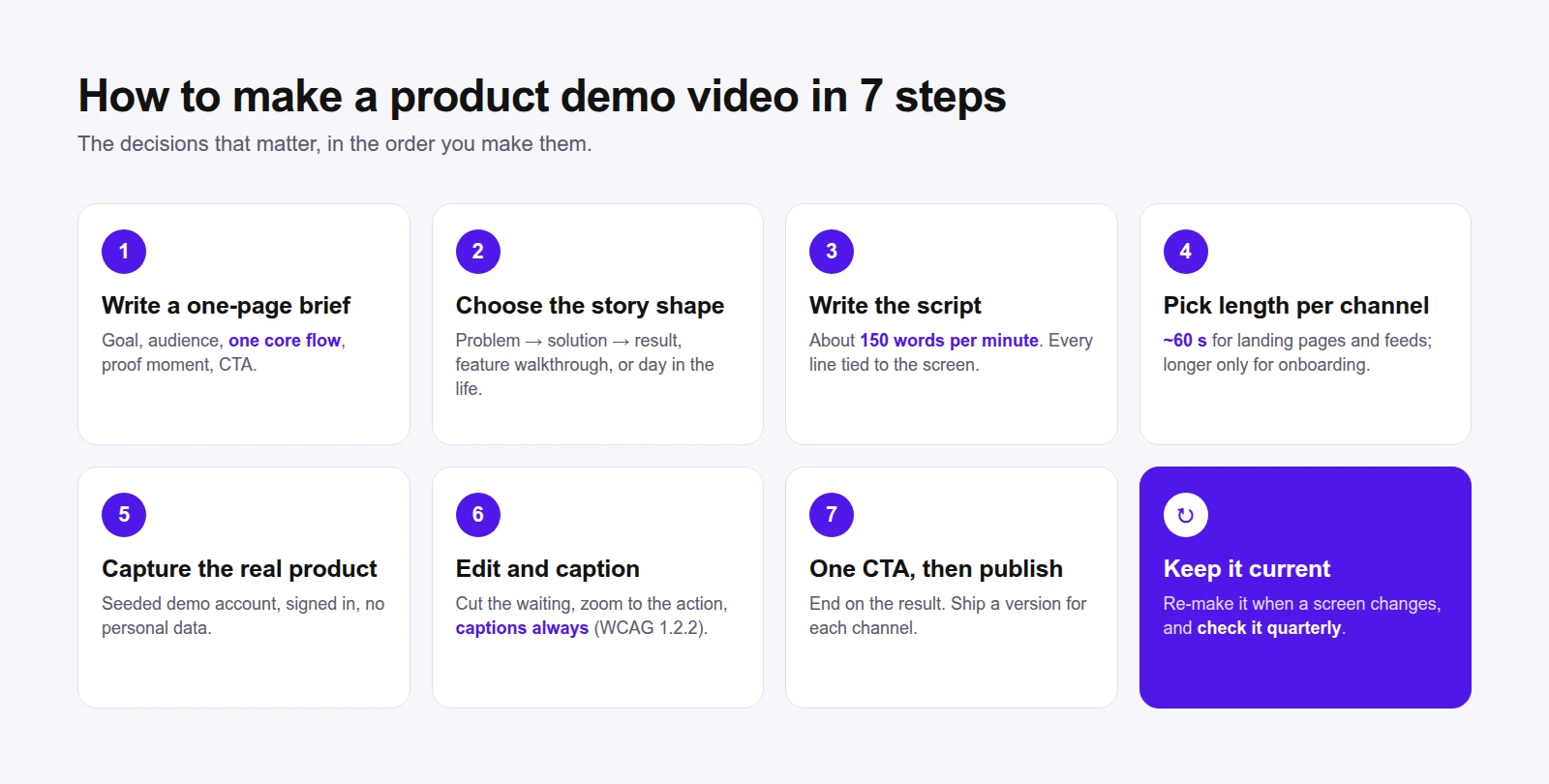
Whichever method you pick, the same seven decisions determine whether the video works. Skipping the first two is the most common reason a product demo video ends up long, vague and unwatched.
Step 1: Write a One-Page Video Brief
A video brief is the single page everyone agrees on before anyone records anything. It is also what you hand an agency, a freelancer or an AI tool. Knowing how to write a video brief for a product demo saves more time than any editing trick, because it prevents the expensive mistake: making the wrong video well.
Copy this template:
| Brief field | What to write | Example |
|---|---|---|
| Goal | The one action the viewer should take next | Start a free trial |
| Audience | Who is watching and what they already know | Marketing managers who have never used the product |
| Problem | The pain, in the viewer's words | "Our demo is out of date every release" |
| Core flow | The single task the video shows, start to finish | Paste a URL → review the plan → get a finished video |
| Proof moment | The result that makes the viewer believe it | The finished video playing with captions |
| Length | Target duration | 60 seconds |
| Channels | Where it will be published | Landing page, LinkedIn, sales emails |
| Must show / must avoid | Screens, data or claims to include or exclude | Show the real dashboard; no customer data |
| CTA | The exact words of the final call to action | "Try it free at demoly.ai" |
If you cannot fill in "Core flow" with one sentence, the product demo video is trying to do too much. Split it into two videos.
Step 2: Choose the Story Shape
Most effective demos follow one of three shapes. Pick one per video.
| Story shape | Structure | Use when |
|---|---|---|
| Problem → solution → result | State the pain, show the fix in the product, end on the outcome | Landing pages, first-touch prospects |
| Feature walkthrough | Show one feature from entry point to finished output | Feature launches, release notes |
| Day in the life | Follow a user role through a realistic task | Sales demos, role-based pages |
Step 3: Write the Demo Video Script
Write narration last-mile simple: short sentences, one idea per sentence, every line tied to something visible on screen. A common planning figure is about 150 words per minute of narration, slightly less if the screen needs time to breathe.
| Video length | Narration words (approx.) | Scenes | Typical use |
|---|---|---|---|
| 30 seconds | 60 – 75 | 3 – 4 | Social teaser, ad |
| 60 seconds | 130 – 150 | 5 – 7 | Landing page, Product Hunt |
| 90 seconds | 200 – 225 | 7 – 9 | Feature walkthrough |
| 2 minutes | 270 – 300 | 9 – 12 | Sales follow-up |
| 3 minutes | 400 – 450 | 12 – 15 | Deep dive, onboarding |
Two rules keep a demo video script honest. Never narrate a feature the viewer cannot see at that moment, and never describe a click instead of showing it. If the narration and the screen disagree, the viewer trusts the screen.
Step 4: Pick the Right Length for Each Channel
There is no single correct length; there is a correct length for each place the video lives. These recommendations follow the engagement data above and common platform behavior:
| Channel | Recommended length | Aspect ratio | Notes |
|---|---|---|---|
| Landing page / homepage | 45 – 90 s | 16:9 | Autoplay muted, so captions are essential |
| Product Hunt / launch posts | 30 – 60 s | 16:9 | Lead with the result in the first 5 seconds |
| LinkedIn / X feed | 30 – 60 s | 1:1 or 16:9 | Most viewers watch without sound |
| Sales follow-up email | 60 – 120 s | 16:9 | Personal intro, then the demo |
| Help center / onboarding | 1 – 3 min per task | 16:9 | One task per video, searchable title |
| Trade show loop | 30 – 60 s | 16:9 | No narration dependence; strong on-screen text |
So, how long should a product demo video be? For most first-touch uses, about 60 seconds. Go longer only when the viewer has already decided to invest the time, such as in onboarding or a sales follow-up.
Step 5: Capture the Real Product
The capture step is where a software or SaaS demo video is won or lost. Prepare the environment before you press record:
| Checklist item | Why it matters |
|---|---|
| Use a clean demo account with realistic sample data | Empty states and "test123" kill credibility |
| Hide personal data, emails and internal tools | Avoids privacy issues and re-shoots |
| Set browser zoom and window size for legibility | Small text is unreadable on a phone |
| Close notifications and extra tabs | Removes distractions from every frame |
| Sign in before recording | Login screens waste the viewer's first seconds |
| Rehearse the exact click path | Hesitation reads as complexity |
If your product needs a signed-in view, plan how the recording session gets access without sharing passwords more widely than necessary.
Step 6: Edit for Pace, Clarity and Captions
Editing is mostly subtraction. Remove page loads, typing delays and any moment where nothing changes. Zoom toward the control being used so viewers on small screens can follow. Add background music under the narration at a low level, and add captions to every product demo video, for three reasons:
- Feeds and many landing pages autoplay muted, so captions carry the message when sound is off.
- Captions for prerecorded video are a Level A requirement in WCAG 2.2 Success Criterion 1.2.2, the baseline most accessibility policies reference.
- A caption file (SRT) doubles as a transcript you can publish next to the video for search and for readers who prefer text.
Step 7: End With One CTA and Publish Everywhere
End on the result, then give exactly one next step that matches the brief: start a trial, book a call or read the docs. Then publish the versions you planned in Step 4, with a descriptive title and a transcript on the page where the video lives.
How to Make an AI Product Demo Video From a URL
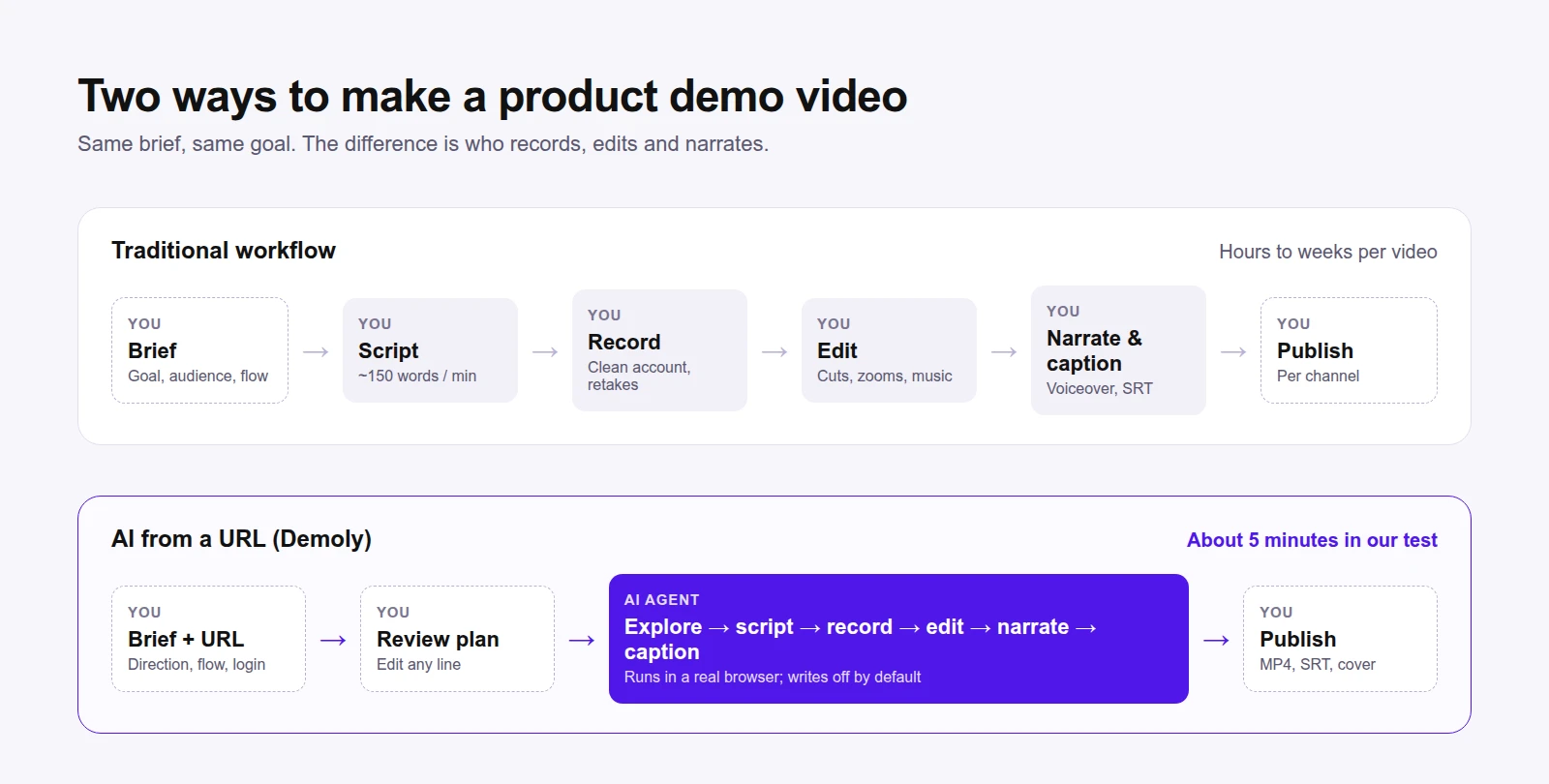
The seven steps above still apply when AI does the production. What changes is who does Steps 3, 5 and 6. To show what that looks like in practice, we made a product demo video of Demoly itself, including the signed-in parts of the app, using Demoly.
1. Describe the video
You paste your product URL, choose the video type (product demo or launch video), and pick a demo direction: product overview, feature walkthrough, onboarding flow, sales demo or new feature launch. Then you describe the flow you want shown, which is essentially the "Core flow" line of your brief.
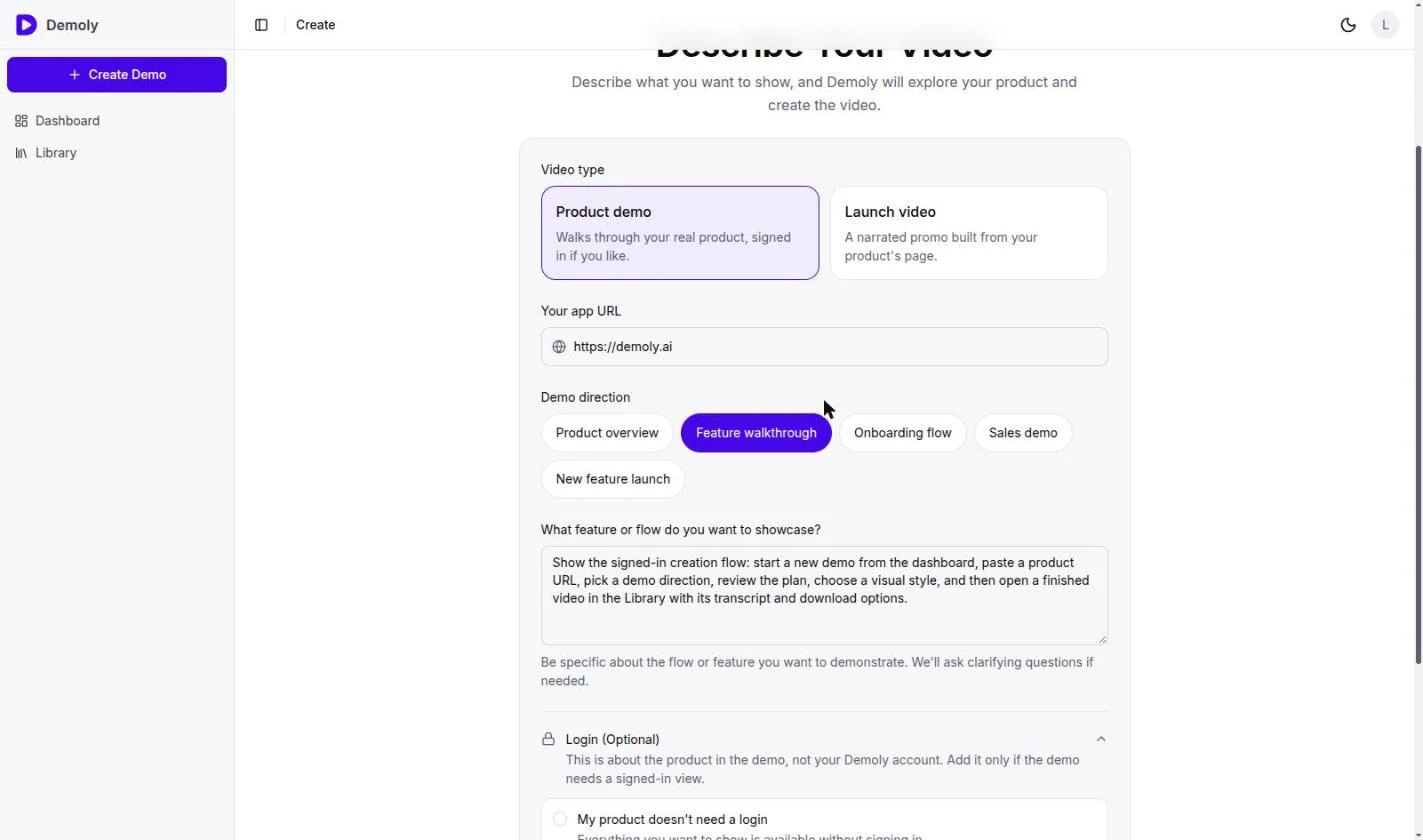 If the flow sits behind a login, you choose Log in with a live browser. Demoly opens a real browser in the demo's sandbox and you sign in yourself; the password goes to your site and is never seen or stored by Demoly.
2. Review the plan
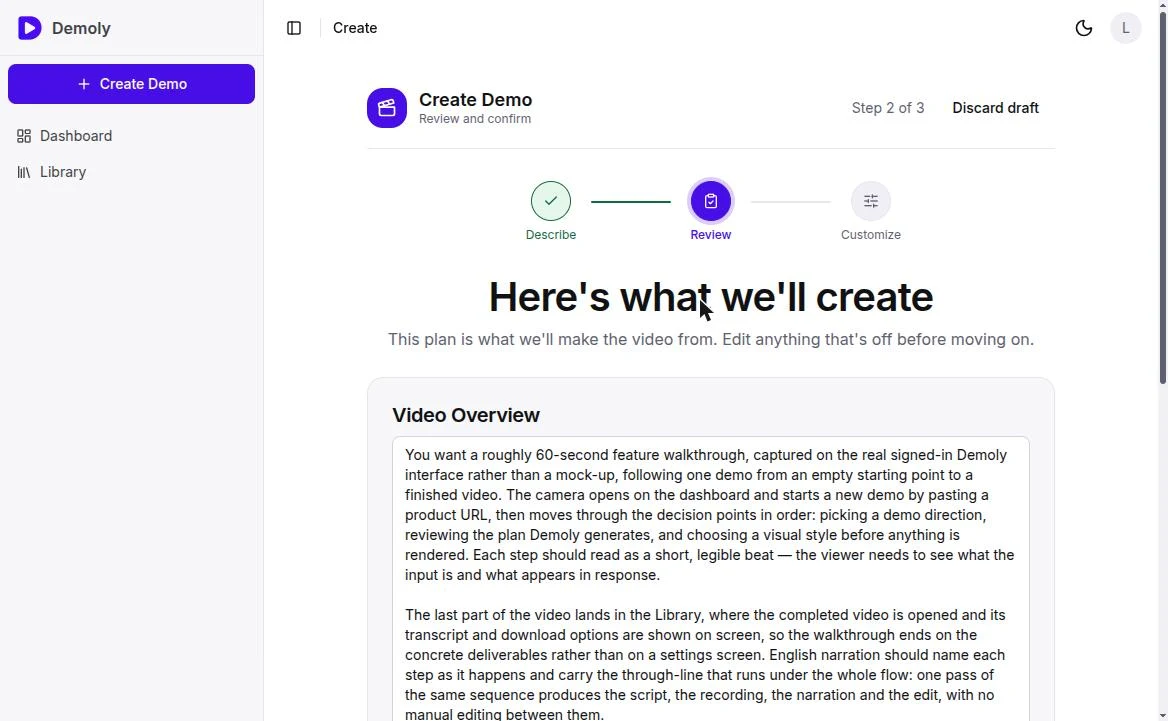
Before any footage is recorded, Demoly writes a plan: a video overview and a list of expected outcomes. Every line is editable. This is your brief, written back to you, and the cheapest place to fix a misunderstanding.
3. Customize the look
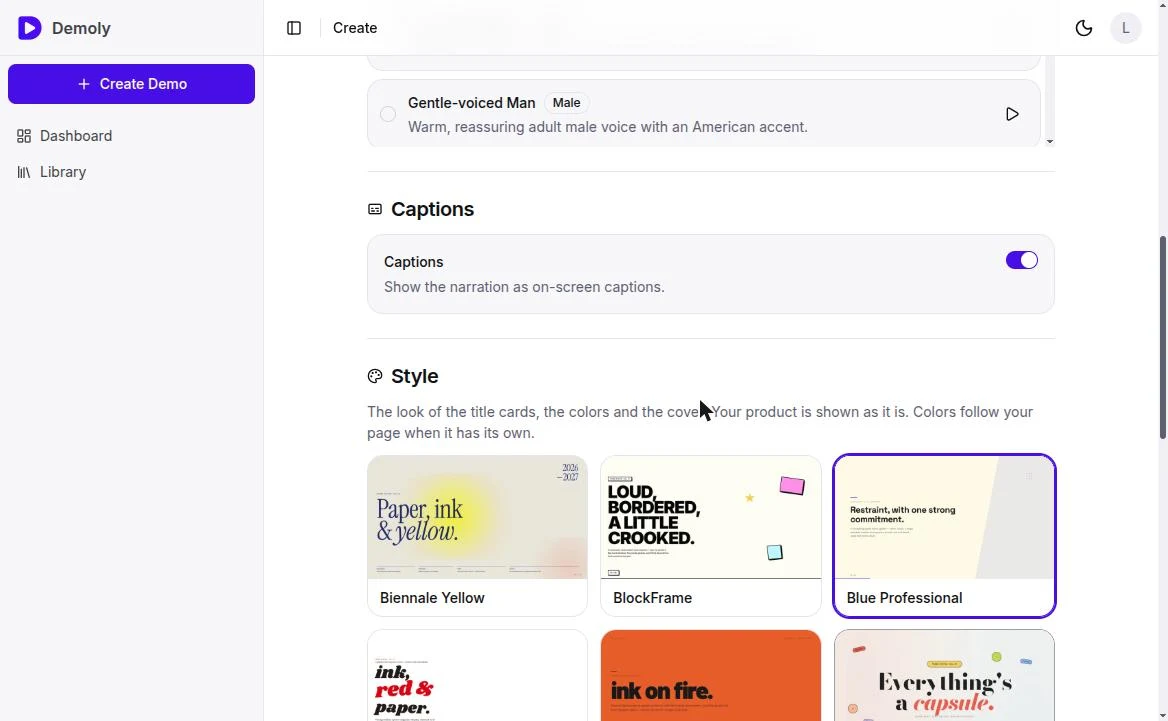
Choose a narrator voice, turn captions on or off, pick one of 12 visual styles for the title cards and cover, and decide whether to open and close with intro and outro cards.
4. Let the agent explore, script, record and edit
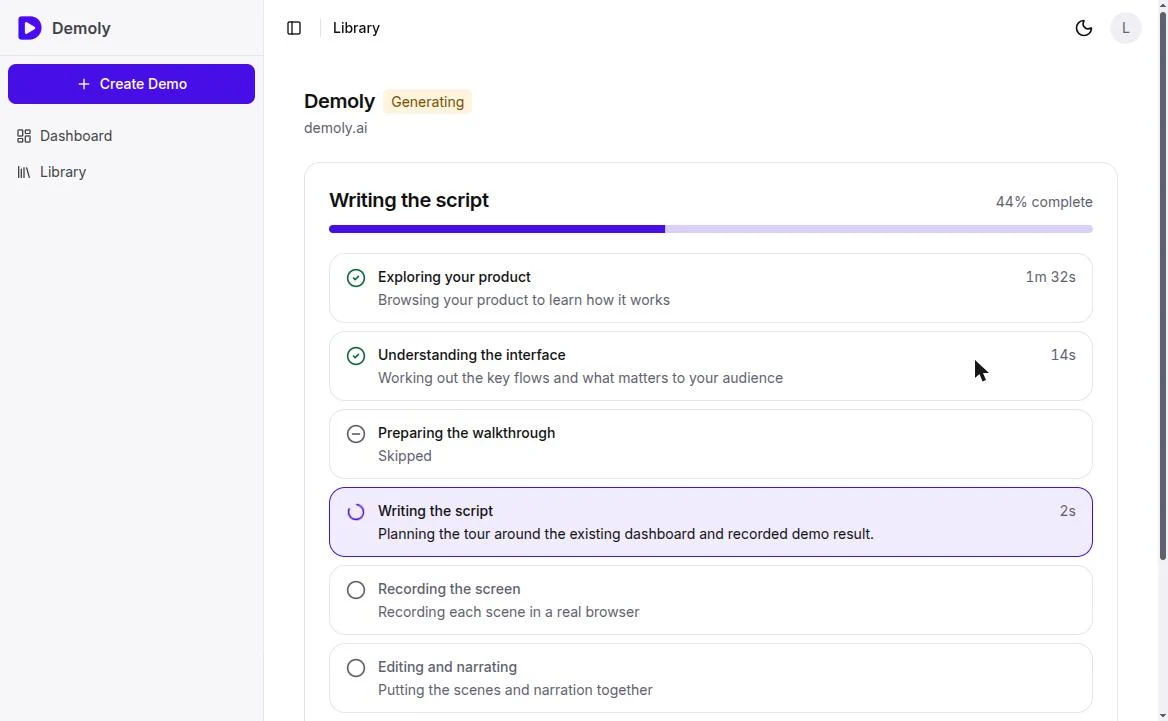
After you press Generate, an AI agent opens your product, explores the interface, plans the scenes, writes the narration, records each scene in a real browser, and edits everything together with voiceover, captions and a cover image. Write actions are off by default, so the agent explores without changing your data.
5. Review, download and share
The finished product demo video opens on its own page with the transcript beside it and a download menu for the video, the cover image and the caption file.
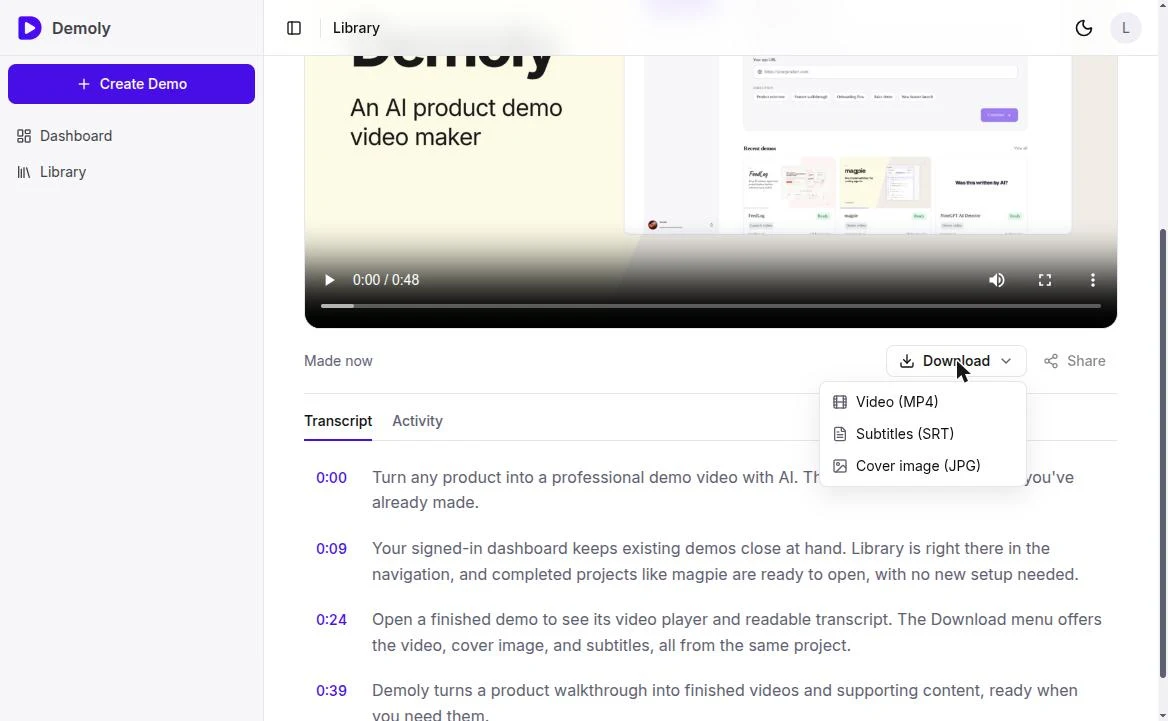 Our test run: we pointed Demoly at demoly.ai, signed in through the live browser, and asked for a product overview: dashboard, Library, one finished video, its transcript and its download menu. Generation took about 5 minutes (exploring 1m 32s, scripting 27s, recording 8s, editing and narration 1m 12s, rendering 1m 05s) and produced a 48-second video with captions, an intro and outro card, and a cover. We didn't edit anything between pressing Generate and downloading the result.
Where human judgment still matters
AI production removes the recording and editing work, not the thinking. You still decide the goal, the audience and the single flow worth showing. A few situations still need a person in the loop:
| Situation | What to do |
|---|---|
| Two-factor authentication or one-time codes | Sign in yourself in the live browser before the run |
| Empty accounts | Use a demo account that already contains realistic data |
| A claim in the narration you can't verify | Edit the plan before generating, or adjust the line afterward |
| Very long or multi-product stories | Split into several short product demo videos |
Keeping Your Product Demo Video Current When the UI Changes
The hidden cost of a product demo video is maintenance. Interfaces change every few weeks; most demo videos are recorded once and quietly go stale. Before choosing a method, ask what an update will cost:
| Method | What a UI change costs you |
|---|---|
| DIY screen recording | Re-record affected scenes, re-edit, re-export, re-caption |
| Agency | A new brief, quote and review cycle |
| Interactive demo | Recapture and re-annotate the affected steps |
| URL-based AI video | Run it again against the live product |
A practical rule: re-make your main product demo video whenever a screen it shows changes visibly, and check it at least once a quarter. If re-making it takes minutes instead of days, you will actually do it.
Common Product Demo Video Mistakes
| Mistake | Fix |
|---|---|
| Showing every feature | One flow per video; link to more |
| Starting with the logo or login screen | Open on the problem or the result |
| Narrating what the viewer can't see | Tie each sentence to a visible action |
| Empty or fake-looking data | Use a seeded demo account |
| No captions | Add captions and publish the transcript |
| Five different CTAs | One CTA that matches the brief |
| Recording once and never updating | Schedule a quarterly refresh |
How to Measure a Product Demo Video
Track a small set of numbers and compare versions rather than chasing an absolute benchmark.
| Metric | What it tells you | Where to find it |
|---|---|---|
| Play rate | Whether the thumbnail and placement earn a click | Video host analytics |
| Average percent watched | Whether the pacing holds attention | Video host analytics |
| Drop-off points | Which scene loses viewers | Audience retention graph |
| CTA click-through | Whether the ending converts | Web analytics, UTM links |
| Trial or demo requests from the page | Business impact | Product analytics, CRM |
If viewers drop at the same second across versions, the problem is the scene, not the length.
Frequently Asked Questions
How long should a product demo video be?
For landing pages and social posts, about 60 seconds. Wyzowl's 2026 survey found most marketers see the best results between 30 seconds and 2 minutes, and Vidyard's data shows 65% of viewers finish videos under a minute. Onboarding and sales follow-up videos can run 2 to 3 minutes because the viewer has already chosen to watch.
What should a product demo video include?
A clear problem, one core flow shown in the real product, a visible result, narration tied to what's on screen, captions, and a single call to action.
How many words is a 60-second demo video script?
Roughly 130 to 150 words. Write fewer if the screen needs pauses for the viewer to read results.
Do I need a voiceover?
For most SaaS demo videos, yes: narration explains why each step matters. Always add captions as well, since many viewers watch with the sound off.
Can AI make a product demo video from my website URL?
Yes. URL-to-video tools such as Demoly open your product in a real browser, explore it, write the script, record the screens and edit the final video. You can sign in through a live browser for flows that require an account.
How much does a product demo video cost?
It depends on the route. Agencies charge per project and take weeks; DIY costs your team's time; AI tools reduce the work to writing a brief and reviewing a plan. Demoly lets you make your first product demo video free.
How often should I update my product demo video?
Whenever a screen it shows changes visibly, and at least once a quarter.
What is the difference between a product demo video and an interactive demo?
A product demo video plays by itself, works anywhere video plays, and tells a guided story. An interactive demo lets the viewer click through a replica at their own pace. Many teams use the video to earn interest and the interactive demo to let qualified buyers explore.
Make Your First Product Demo Video
A product demo video works when it shows one real flow, quickly, to one audience, with one next step. Write the brief first, keep the script to about 150 words a minute, size the video for each channel, add captions, and plan for updates from day one.
If you want to skip the recording and editing, create your first product demo video with Demoly: paste your product URL, review the plan, and get a narrated, captioned video in minutes. Your first video is free.